Clerical Training Videos - Employees Only
How to GET NEW REP's EQUIFAX LOGIN and Password Video.
See ALL OTHER Clerical Videos Below!!
NOTE: You won't be able to assign "DEALER USER ROLE" at first. Create New User then Save. Then WAIT for like 15 minutes, log off and then log back on to see the NEW USER show up on the LIST. Then click on them and assign them the Dealer User Role.
**NEW**
- Before we email them, log out of equifax and log back in with the NEW REP'S ID and Password. Immediately it will ask you to make a NEW PASSWORD. Go ahead and make a new password (try to make this one Winner1! so we be easy for all of us). You then can log out once new password is accepted.
- Send them email with info.
- Write all equifax info their ID and Password on the INSIDE of their employee file.
- Make a PRINT out & give to them stating:
- Equifax Info for running credit:
- Log into: http://go.alarmsacrossamerica.com
- Client Code: adtdealer
- System Code: adtdealer
- ID: (give them the ID you made for them)
- Password: (give them the Password you made for them)
- Equifax Info for running credit:
Other Clerical Videos OR Documentation:
- How to EMAIL or PRINT Contracts or Attachments from FILLQUICK. CLICK HERE
- RESET and Reboot Internet Connection for All Computers. CLICK HERE
- How to MAKE Picture ID for a Brand New Rep. CLICK HERE
- Scan to Email with Brother Printer/Scanner (sorry upside down video) CLICK HERE
- Flip House Program $399 with 6 month agreement CLICK HERE
- How to make a DIGITAL ID for Sales Reps CLICK HERE
- How to Clean up ADT PPR with FILLQUICK Customer CLICK HERE
- How to get ALL PAPERWORK Deals INTO FILLQUICK CLICK HERE
- How to get Indeed Applicants to Hubspot CLICK HERE
Important Policies/Procedures:
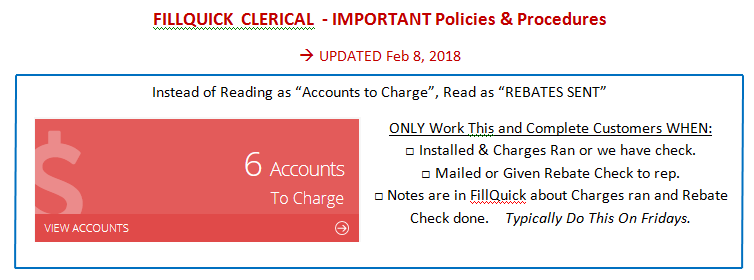
- Every customer that calls there should be a NOTE in fillquick about why they are calling. Can use short verbiage like: updated CC, One time Checking to get caught up, needed certificate, considering canceling, moving in june, etc.
- Every email correspondence with ADT must be CC or BCC to mikedee1@aol.com. This includes new accounts, dealer support, consolidated billing, etc. Every email please.
- Paperwork must be reviewed for perfection before sending to ADT. Always include submission form with new PAPER deals.
- RE-READ and WATCH ALL VIDEOS and items on this Page WEEKLY.
- Loree to update passwords whenever needed to be changed in folder.
Let MIKE Know if you would like to have ANY other Video Recording:)
Creating an Inhouse Account/Shell
- Obtain an account number from ADT’s website under TOOLS àGET ACCOUNT NUMBER.
- Fill out the customer info online and submit to get the account number.
- Write the account number on the top of each page of the customer contract.
- Fax to ADT at (800)338-8698 (programmed into AAA Fax machine under “new accounts”) with the cover page explaining the reason for the request (ie: refused credit check, failed credit, renter, etc.)
How to Approve & Accept Fillquick Customers once Rep gets online signed paperwork
Checking Address Exception and Putting a Note in FillQuick is a MUST! DO NOT get an account number until you put a note that account is cleared which may mean you have to Call ADT first. If have to call ADT then give them the ORDER number for them to research. DO NOT get the account number until you put a NOTE in Fillquick that it is CLEARED with ADT or its Okay to Proceed. This is a mandatory procedure that must be followed. Not doing this can result in losing a deal. thank you:)
- Log into fill quick and select Dashboard.
- Select “waiting acceptance” and select the new account.
- Select “ADT” (blue box) that will link you to another page of the account where you can see other details of the account. Read “Address Validation” and “Address Matching”.
- If there IS a Duplicate address exception and says to Call ADT before proceeding then CALL ADT at (877)323-6856 “1” for English and “3” for Atlantic. They will need the ORDER ID Number that is located under the ADT section of the account (there is a blue box to click on). They will let you know if you CAN proceed OR if it is a dealer dispute.
- If dealer dispute, Let Mike know right away because we cannot INSTALL this until that is resolved. DON’T GO FURTHER and STOP THE INSTALL!
- If ADT says okay to proceed but will NEED PROOF of new customer, please Email Mike so he can Obtain that documentation. However, can proceed to step 4. If ADT says okay to proceed then got to Step 4.
- If there IS a Duplicate address exception and says to Call ADT before proceeding then CALL ADT at (877)323-6856 “1” for English and “3” for Atlantic. They will need the ORDER ID Number that is located under the ADT section of the account (there is a blue box to click on). They will let you know if you CAN proceed OR if it is a dealer dispute.
- Select, “General Info” tab at top left and scroll all the way to NOTES. Put one of the Appropriate Notes:
- No Address Exception. Okay to Proceed.
- Address Exception but says Okay to Proceed.
- Address Exception. Called ADT and stated Okay to Proceed because different person (new home owner).
- Address Exception. Called ADT and stated Okay to Proceed because different person but NEED “Proof of New Customer”.
- ADDRESS EXCEPTION and ADT SAID DEALER DISPUTE. LET MIKE KNOW ASAP. PUT “STOP INSTALL-DEALER DISPUTE” in Install Calendar. DIDN’T GET ACCOUNT NUMBER.
- After you selected, “ADD NOTE” then screen will refresh and take you to the TOP of the Note. You then NEED to scroll all the way to bottom and Select, “SAVE”.
- Then screen will refresh again and take you to the TOP of the SCREEN. You will once again need to scroll all the way to the bottom and Select, “ACCEPT”
- Select the ADT (blue box) again and click on Confirmation to get the Account Number. Get the account number. You will need to wait like a minute (don’t change screens while waiting). Once you see the Account number and you now have 4 Green Checkmarks then you are done.
How to do Commission Sheets
- Verify Zones with the Equipment list. If no zones are listed, ask Jack to finalize account in Fillquick.
- For the first keyfob, there are no points.
- For the first Camera or Doorbell Camera, there are no points on the $59.99 package.
- For the first Camera or Doorbell Camera AND first DoorLOCK, there are no points on the $64.99 package.
- For Existing Systems, count ALL EXISTING Equipment as 2 POINTS regardless of how many existing pieces of equipment they have. We always add new touchscreen panel, hence: 2 points for new touchscreen panel and 2 points for ALL Existing Equipment. Reps have 3 points to give away for free.
WORK ORDERS
- Find Customer in Fill Quick then Select “SERVICES” Tab.
- Select “+ NEW SERVICE”
- Fill out All INFO INCLUDING Amount to be charged.
Manual Reviews (when reps cannot obtain credit score)
- First thing is we need to submit all documents to ADT in order for them to run credit manually.
- Place all 4 pages of contract (top of pages in first) face down in the fax machine. (Do NOT need to remove the top perforated holes).
- Press first key of left marked MR (800-835-9035) and then fax key on bottom right side.
- Approximately 24 to 48 hours, check EQUIFAX site to see how credit comes back.
- If Approved Credit then copy the Equifax application ID and create the shell manually on the ADT Dealer Web.
- If Credit fails then it will need to be an Inhouse account. Follow those procedures to create inhouse account.